
PetPress FAQ
General Topics
What are the technical requirements for PetPress?
Can I customize the detail page for animals?
How do I find out about recent changes / Where are the release notes?
How do I create lists for specific species?
AnimalsFirst Topics
I have an AnimalsFirst account and a WordPress-based website. What do I need to use PetPress?
PetPoint Topics
I have a PetPoint account and a WordPress-based website. What do I need to use PetPress?
PetFinder Topics
The descriptions for animals are shortened to 20 words when using PetFinder as the data source. How do I enable full-length descriptions?
What are the technical requirements for PetPress?
PetPress requires a WordPress website and an account with either PetPoint or PetFinder. The actual animal data is managed in PetPoint/PetFinder; PetPress is not for managing shelter animal information, only for displaying it on your website.
How do I create lists for specific species?
You can specify a species by using the “species” parameter in your shortcode. The values for species are:
- 0 – all animals
- 1 – dogs
- 2 – cats
- 3 – rabbits
- 4 – horses
- 5 – small and furry
- 6 – pigs
- 7 – reptiles
- 8 – birds
- 9 – barnyard
- 1003 – all animals not dogs or cats
Can I customize the detail page for animals?
With the premium version, you can specify a specific page to act as your “detail page”. Here’s how it works:
PetPress has two views: a “list page” and a “detail page”. The list page shows one or more tiles representing each animal in a list, and the detail page shows all available information on one specific animal. By default, both of these “pages” use the same WordPress page, which means that both the list and detail pages will have the same context (ie: header, footer, sidebar, etc).
In the premium version, you can designate a specific page as the one to use as a detail page. Create the page as you would any other in WordPress, and include the PetPress shortcode (ie: “PetPress” in square brackets) wherever you want the animal details to go. You can include any other content you want before or after the shortcode.
This detail page will get a custom URL for each animal, so visitors will be able to bookmark and share links.
How do I find out about recent changes / Where are the release notes?
Please consult the PetPress Release Notes for this information. The PetPress Blog also contains articles about PetPress features.
I have an AnimalsFirst account and a WordPress-based website. What do I need to use PetPress?
To use PetPress, you will need to know your AnimalsFirst API Key (also known as your “Authorization Key”). This is a long string of letters and numbers that identifies your shelter and is needed so that PetPress can ask for the correct information. Contact AnimalsFirst with your account information to get your API key.
I have a PetPoint account and a WordPress-based website. What do I need to use PetPress?
To use PetPress, you will need to know your PetPoint Authorization Key (also known as your “Auth_Key”). This is a long string of letters and numbers that identifies your shelter and is needed so that PetPress can ask for the correct information. Your Authorization Key can be found in the admin area of PetPoint.
The descriptions for animals are shortened to 20 words when using PetFinder as a data source. How do I enable full-length descriptions?
The PetFinder data feed shortens “descriptions” to 20 words by default. This is, according to one of the developers, to encourage visitors to return to PetFinder to read descriptions. It turns out, though, that PetFinder will remove this 100 character limit upon request:
- Vist the page https://help.petfinder.com/s/contactsupport
- Choose “Technology Help” as the category.

- On the next screen, fill in all your details. Be sure to provide your Shelter ID so they know whose account to remove the field length restriction from. And choose ‘API Help’ as the support topic.
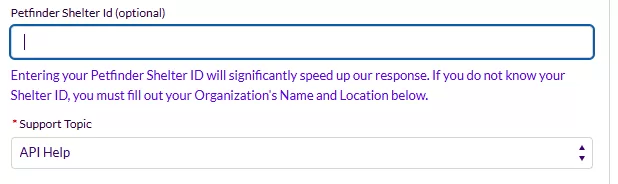
- In the description field, please explain the problem and ask for the limit to be removed on your account.
(many thanks to Rachel for documenting this process!)